3.1.6. timeSeries Command
This command is used to construct a TimeSeries object, which defines how a load factor varies with time in the domain. A load pattern uses its time series to scale its loads and imposed displacements.
- timeSeries $type $tag $arg1 ...
ops.timeSeries(type, tag, *args)
Argument |
Type |
Description |
|---|---|---|
$type |
string |
type of time series |
$tag |
integer |
unique time series tag |
$args |
list |
a list of arguments with args depending on type |
The following subsections contain information about $type and the specifics of the args required for each:
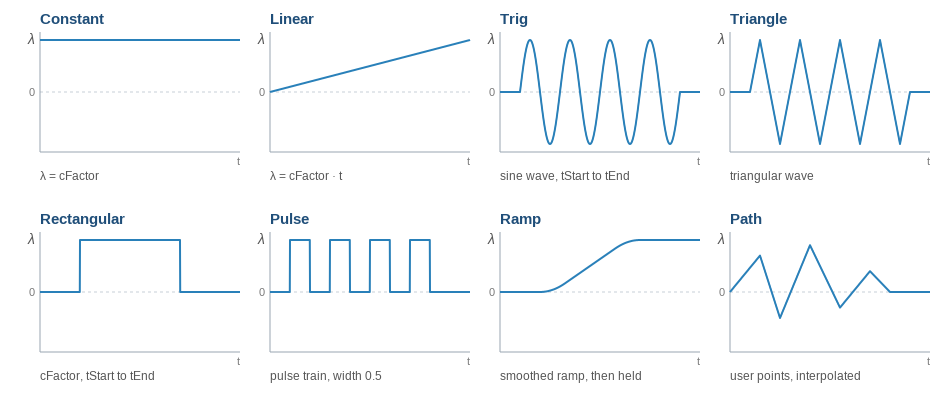
Fig. 3.1.6.9 Load factor \(\lambda(t)\) for some of the time series types
Background
A TimeSeries object represents the relationship between the time in the domain, \(t\), and a load factor, \(\lambda\):
Each load pattern is given a time series when it is created. For example, the Plain Pattern command takes the tag of the time series to use, and the UniformExcitation Pattern pattern takes the tag of the time series that defines the ground acceleration. Several load patterns can use the same time series.
Every time the analysis moves to a new time, each load pattern asks its time series for the load factor at that time. The load pattern then applies its loads, and the values of its imposed displacements, multiplied by that load factor.
What the time in the domain means depends on the type of analysis:
In a transient analysis it is the real time, advanced by the time step given to the analyze command. The time series then describes how the loading actually varies with time, e.g. a recorded ground acceleration.
In a static analysis it is a pseudo-time, a counter advanced by the integrator. With the LoadControl integrator it is advanced by the load increment each step. With a Linear TimeSeries the load factor is then equal to this pseudo-time, so the loads grow in proportion to it.
A common example is a gravity analysis followed by a pushover or earthquake analysis. The gravity loads are applied with a Linear series in a static analysis. The loadConst command then holds them constant and resets the time to zero before the next analysis starts.