3.1.3.59. ElastomericBearingPlasticity Element
This command is used to construct an elastomericBearing element object, which is defined by two nodes. The element can have zero length or the appropriate bearing height. The bearing has unidirectional (2D) or coupled (3D) plasticity properties for the shear deformations, and force-deformation behaviors defined by UniaxialMaterials in the remaining two (2D) or four (3D) directions. By default (sDratio = 0.5) P-Delta moments are equally distributed to the two end-nodes. To avoid the introduction of artificial viscous damping in the isolation system (sometimes referred to as “damping leakage in the isolation system”), the bearing element does not contribute to the Rayleigh damping by default. If the element has non-zero length, the local x-axis is determined from the nodal geometry unless the optional x-axis vector is specified in which case the nodal geometry is ignored and the user-defined orientation is utilized. The command name elastomericBearing is an alias for elastomericBearingPlasticity.
For a two-dimensional problem:
- element elastomericBearingPlasticity $eleTag $iNode $jNode $kInit $qd $alpha1 $alpha2 $mu -P $matTag -Mz $matTag <-orient $x1 $x2 $x3 $y1 $y2 $y3> <-shearDist $sDratio> <-doRayleigh> <-mass $m>
For a three-dimensional problem:
- element elastomericBearingPlasticity $eleTag $iNode $jNode $kInit $qd $alpha1 $alpha2 $mu -P $matTag -T $matTag -My $matTag -Mz $matTag <-orient <$x1 $x2 $x3> $y1 $y2 $y3> <-shearDist $sDratio> <-doRayleigh> <-mass $m>
For a two-dimensional problem:
ops.element('elastomericBearingPlasticity', eleTag, iNode, jNode, kInit, qd, alpha1, alpha2, mu, '-P', matTag, '-Mz', matTag, <'-orient', x1, x2, x3, y1, y2, y3>, <'-shearDist', sDratio>, <'-doRayleigh'>, <'-mass', m>)
For a three-dimensional problem:
ops.element('elastomericBearingPlasticity', eleTag, iNode, jNode, kInit, qd, alpha1, alpha2, mu, '-P', matTag, '-T', matTag, '-My', matTag, '-Mz', matTag, <'-orient', <x1, x2, x3>, y1, y2, y3>, <'-shearDist', sDratio>, <'-doRayleigh'>, <'-mass', m>)
Argument |
Type |
Description |
|---|---|---|
$eleTag |
integer |
unique element object tag |
$iNode $jNode |
2 integer |
end nodes |
$kInit |
float |
initial elastic stiffness in local shear direction |
$qd |
float |
characteristic strength |
$alpha1 |
float |
post yield stiffness ratio of linear hardening component |
$alpha2 |
float |
post yield stiffness ratio of non-linear hardening component |
$mu |
float |
exponent of non-linear hardening component |
-P $matTag |
integer |
tag associated with previously-defined UniaxialMaterial in axial direction |
-T $matTag |
integer |
tag associated with previously-defined UniaxialMaterial in torsional direction (3D only) |
-My $matTag |
integer |
tag associated with previously-defined UniaxialMaterial in moment direction around local y-axis (3D only) |
-Mz $matTag |
integer |
tag associated with previously-defined UniaxialMaterial in moment direction around local z-axis |
$x1 $x2 $x3 |
list float |
vector components in global coordinates defining local x-axis (optional) |
$y1 $y2 $y3 |
list float |
vector components in global coordinates defining local y-axis (optional) |
$sDratio |
float |
shear distance from iNode as a fraction of the element length (optional: default = 0.5) |
-doRayleigh |
string |
to include Rayleigh damping from the bearing (optional: default = no Rayleigh damping contribution) |
$m |
float |
element mass (optional: default = 0.0) |
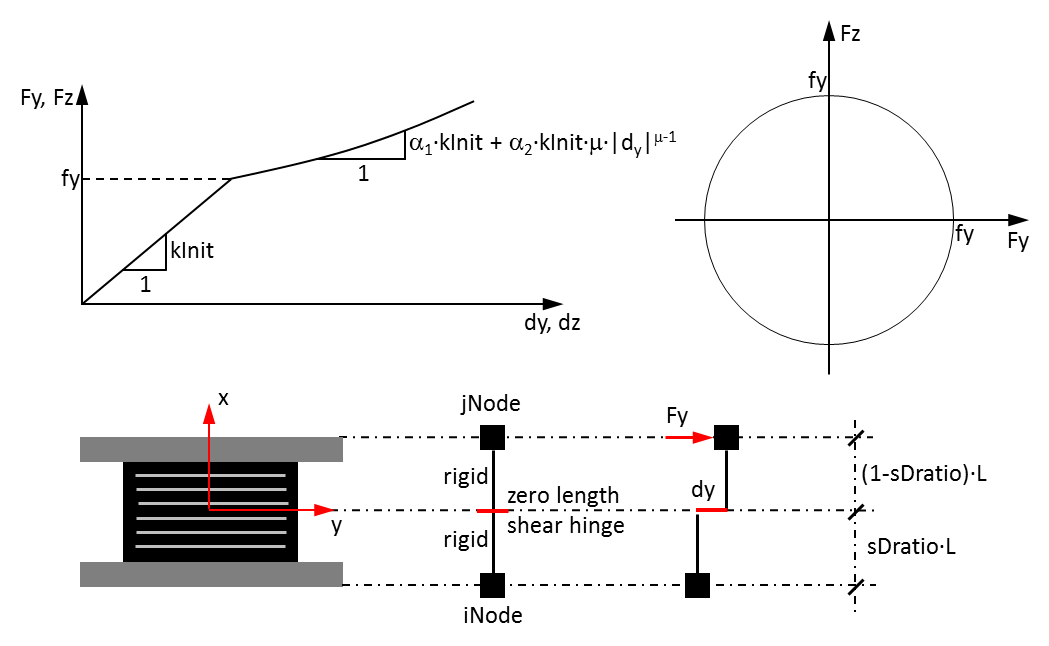
Fig. 3.1.3.34 ElastomericBearingPlasticity element: shear force-deformation behavior, coupled 3D yield surface, and element geometry
Note
If the element has zero length and optional orientation vectors are not specified, the local element axes coincide with the global axes. Otherwise the local z-axis is defined by the cross product between the x- and y-vectors specified on the command line.
The bearing is stiff in compression but not rigid. Using unrealistically large values (e.g. 1E10) for the axial stiffness can lead to numerical problems, so a realistic axial stiffness should be specified. To get different stiffness in tension and compression, use an Elastic (with
$Eneg) or ElasticMultiLinear UniaxialMaterial for the axial direction.Valid queries to the elastomericBearingPlasticity element when creating an Element Recorder are
force(orglobalForce),localForce,basicForce,localDisplacement,basicDisplacement(orbasicDeformation),basicStiffness, andmaterial $matNum matArg1 matArg2 ..., where$matNumis the number (1 to 2 in 2D, 1 to 4 in 3D, in the order the materials appear in the command) of the material whose data is to be output.
Example
Tcl Code
# 2D elastomeric bearing
element elastomericBearingPlasticity 1 1 2 20.0 2.50 0.02 0.0 3.0 -P 1 -Mz 2

# 3D elastomeric bearing
element elastomericBearingPlasticity 1 1 2 20.0 2.50 0.02 0.0 3.0 -P 1 -T 2 -My 3 -Mz 4
Python Code
# 2D elastomeric bearing
ops.element('elastomericBearingPlasticity', 1, 1, 2, 20.0, 2.50, 0.02, 0.0, 3.0, '-P', 1, '-Mz', 2)

# 3D elastomeric bearing
ops.element('elastomericBearingPlasticity', 1, 1, 2, 20.0, 2.50, 0.02, 0.0, 3.0, '-P', 1, '-T', 2, '-My', 3, '-Mz', 4)
Code Developed by: Andreas Schellenberg at University of California, Berkeley.