3.1.3.61. FlatSliderBearing Element
This command is used to construct a flatSliderBearing element object, which is defined by two nodes. The iNode represents the flat sliding surface and the jNode represents the slider. The element can have zero length or the appropriate bearing height. The bearing has unidirectional (2D) or coupled (3D) friction properties for the shear deformations, and force-deformation behaviors defined by UniaxialMaterials in the remaining two (2D) or four (3D) directions. To capture the uplift behavior of the bearing, the user-specified UniaxialMaterial in the axial direction is modified for no-tension behavior. By default (sDratio = 0.0) P-Delta moments are entirely transferred to the flat sliding surface (iNode). It is important to note that rotations of the flat sliding surface (rotations at the iNode) affect the shear behavior of the bearing. To avoid the introduction of artificial viscous damping in the isolation system (sometimes referred to as “damping leakage in the isolation system”), the bearing element does not contribute to the Rayleigh damping by default. If the element has non-zero length, the local x-axis is determined from the nodal geometry unless the optional x-axis vector is specified in which case the nodal geometry is ignored and the user-defined orientation is utilized.
For a two-dimensional problem:
- element flatSliderBearing $eleTag $iNode $jNode $frnMdlTag $kInit -P $matTag -Mz $matTag <-orient $x1 $x2 $x3 $y1 $y2 $y3> <-shearDist $sDratio> <-doRayleigh> <-mass $m> <-iter $maxIter $tol>
For a three-dimensional problem:
- element flatSliderBearing $eleTag $iNode $jNode $frnMdlTag $kInit -P $matTag -T $matTag -My $matTag -Mz $matTag <-orient <$x1 $x2 $x3> $y1 $y2 $y3> <-shearDist $sDratio> <-doRayleigh> <-mass $m> <-iter $maxIter $tol>
For a two-dimensional problem:
ops.element('flatSliderBearing', eleTag, iNode, jNode, frnMdlTag, kInit, '-P', matTag, '-Mz', matTag, <'-orient', x1, x2, x3, y1, y2, y3>, <'-shearDist', sDratio>, <'-doRayleigh'>, <'-mass', m>, <'-iter', maxIter, tol>)
For a three-dimensional problem:
ops.element('flatSliderBearing', eleTag, iNode, jNode, frnMdlTag, kInit, '-P', matTag, '-T', matTag, '-My', matTag, '-Mz', matTag, <'-orient', <x1, x2, x3>, y1, y2, y3>, <'-shearDist', sDratio>, <'-doRayleigh'>, <'-mass', m>, <'-iter', maxIter, tol>)
Argument |
Type |
Description |
|---|---|---|
$eleTag |
integer |
unique element object tag |
$iNode $jNode |
2 integer |
end nodes (iNode is the flat sliding surface and jNode is the slider) |
$frnMdlTag |
integer |
tag associated with previously-defined frictionModel Command |
$kInit |
float |
initial elastic stiffness in local shear direction |
-P $matTag |
integer |
tag associated with previously-defined UniaxialMaterial in axial direction |
-T $matTag |
integer |
tag associated with previously-defined UniaxialMaterial in torsional direction (3D only) |
-My $matTag |
integer |
tag associated with previously-defined UniaxialMaterial in moment direction around local y-axis (3D only) |
-Mz $matTag |
integer |
tag associated with previously-defined UniaxialMaterial in moment direction around local z-axis |
$x1 $x2 $x3 |
list float |
vector components in global coordinates defining local x-axis (optional) |
$y1 $y2 $y3 |
list float |
vector components in global coordinates defining local y-axis (optional) |
$sDratio |
float |
shear distance from iNode as a fraction of the element length (optional: default = 0.0) |
-doRayleigh |
string |
to include Rayleigh damping from the bearing (optional: default = no Rayleigh damping contribution) |
$m |
float |
element mass (optional: default = 0.0) |
$maxIter |
integer |
maximum number of iterations to undertake to satisfy element equilibrium (optional: default = 25) |
$tol |
float |
convergence tolerance to satisfy element equilibrium (optional: default = 1E-12) |
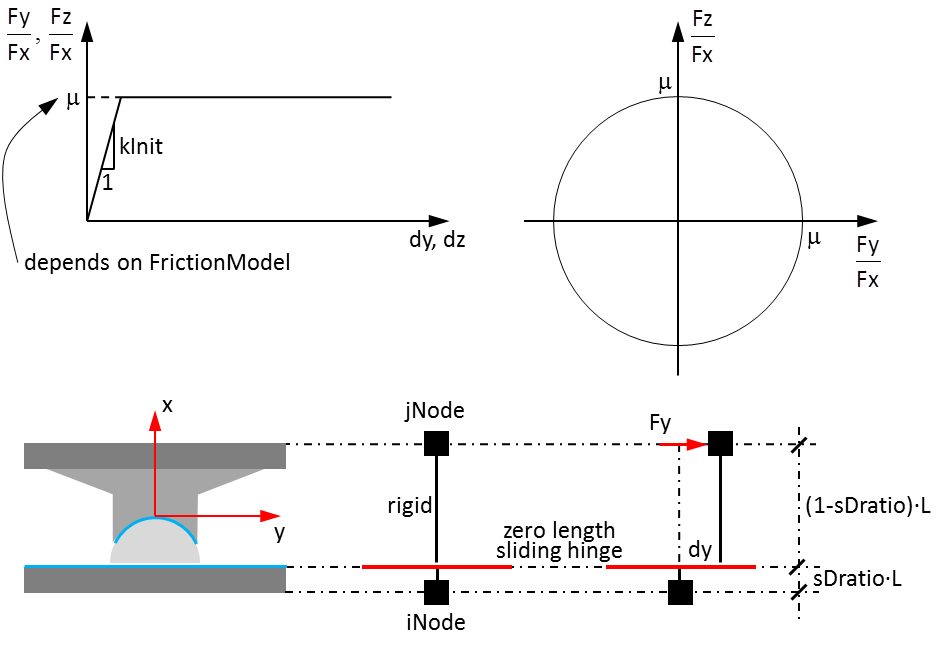
Fig. 3.1.3.37 FlatSliderBearing element: shear force-deformation behavior, coupled 3D friction surface, and element geometry
Note
If the element has zero length and optional orientation vectors are not specified, the local element axes coincide with the global axes. Otherwise the local z-axis is defined by the cross product between the x- and y-vectors specified on the command line.
Because the friction force depends on the axial force and the slip rate, the element can be numerically sensitive. For dynamic analysis, a time step smaller than the one used for the same structure without isolators is recommended.
If uplift occurs, impact can be encountered. In such cases it is recommended to use an integration method with numerical damping, and to add viscous damping to the axial material to dissipate the impact energy.
Valid queries to the flatSliderBearing element when creating an Element Recorder are
force(orglobalForce),localForce,basicForce,localDisplacement,basicDisplacement(orbasicDeformation),frictionModel ...(passed on to the friction model), andmaterial $matNum matArg1 matArg2 ..., where$matNumis the number (1 to 2 in 2D, 1 to 4 in 3D, in the order the materials appear in the command) of the material whose data is to be output.
Example
Tcl Code
# 2D flat slider bearing
element flatSliderBearing 1 1 2 1 250.0 -P 1 -Mz 2 -orient 0 1 0 -1 0 0

# 3D flat slider bearing
element flatSliderBearing 1 1 2 1 250.0 -P 1 -T 2 -My 3 -Mz 4 -orient 0 0 1 -1 0 0
Python Code
# 2D flat slider bearing
ops.element('flatSliderBearing', 1, 1, 2, 1, 250.0, '-P', 1, '-Mz', 2, '-orient', 0, 1, 0, -1, 0, 0)

# 3D flat slider bearing
ops.element('flatSliderBearing', 1, 1, 2, 1, 250.0, '-P', 1, '-T', 2, '-My', 3, '-Mz', 4, '-orient', 0, 0, 1, -1, 0, 0)
Code Developed by: Andreas Schellenberg at University of California, Berkeley.